Keeping your records up to date with your bank is crucial, especially when it comes to your CNIC (Computerized National Identity Card) information. Your CNIC is the primary identity document linked to your bank account, and if it expires, your account could become dormant or inactive. This could lead to disruptions in your banking services, depending on the bank’s policies. If you’re an Askari Bank customer and your CNIC has expired, you can easily update it online using the Askari Digital App.
Step by Step Guide to update CNIC expiry in Askari Bank
Follow this simple guide, which will walk you through the process step by step.
Step 1: Download and Install the Askari Digital App
First, ensure that you have the Askari Digital App installed on your smartphone. If you haven’t done so already, you can download it from the Google Play Store.
Step 2: Register or Sign In
If you’re new to the Askari Digital App, you’ll need to register by following the on-screen instructions. If you already have an account, simply sign in using your credentials.
Step 3: Access Profile Settings
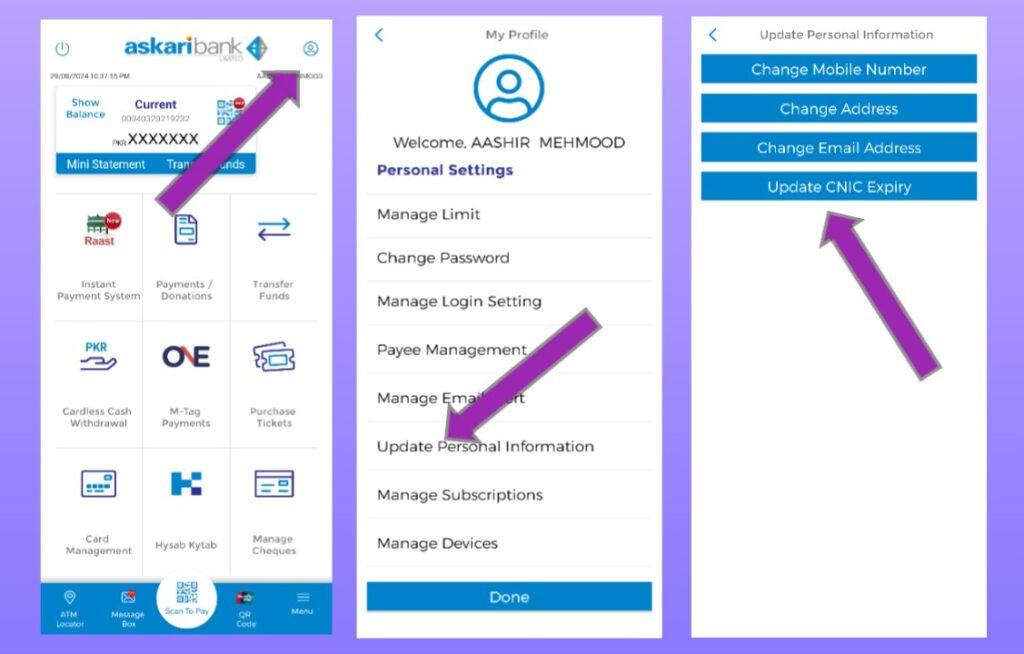
Once you’re signed in, navigate to the top right corner of the app where you’ll see a profile icon. Tap on it to access your profile settings.
Step 4: Update Personal Information
In the profile settings menu, look for the option that says “Update Personal Information” and click on it.
Step 5: Update CNIC Expiry
Next, tap on the “Update CNIC Expiry” option. You will be prompted to enter the expiry date of your new CNIC. Fill in the correct details and submit the information.
Important Note:
The Askari Digital App may not allow you to update the CNIC expiry date until your current CNIC has officially expired. If this happens, you will either need to wait until the expiry date or visit the nearest Askari Bank branch to update your CNIC information in person.
Step 6 (Optional): Contact Customer Support
If you encounter any issues during the process or have additional queries, you can reach out to Askari Bank’s customer support. You can either call their helpline at UAN: 111-000-787 or chat with them via WhatsApp using your registered number at (+92) 333-0007871.
Conclusion
Updating your CNIC information with Askari Bank is a straightforward process that can be done conveniently through the Askari Digital App. Follow these steps to ensure your bank records are always up to date, preventing any interruptions in your banking services. Remember, keeping your CNIC details current is essential to avoid your account becoming dormant or inactive, which could disrupt your banking experience.